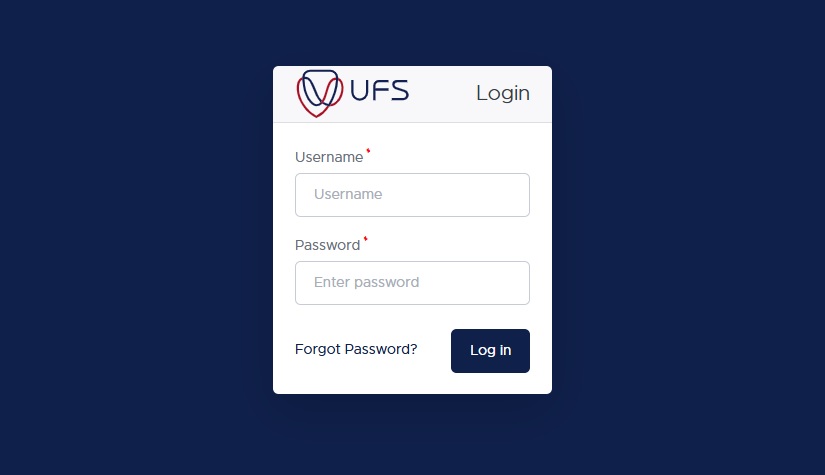
Applying to a university is a significant milestone, and after submitting your application to the University of the Free State (UFS) for the 2026/2027 academic year, the next logical step is monitoring its progress. The waiting period can be filled with anticipation, but the university provides a straightforward online system to keep you informed.
Understanding How to Check UFS Application Status is crucial for prospective students. It ensures you don’t miss important updates, such as requests for additional documents or an official admission offer. This guide provides a clear, step-by-step walkthrough of the process, explains the various status messages you might encounter, and offers practical advice to navigate the admissions cycle smoothly. The University of the Free State, with its main campus in Bloemfontein and additional campuses in Qwaqwa and South Campus, handles thousands of applications each year, making it essential to know exactly where you stand in the process .
Why Choose the University of the Free State?
Before diving into the technicalities of the status check, it is worth understanding the institution you hope to join. The University of the Free State (UFS) is recognized as one of the leading higher education institutions in South Africa . Its reputation extends beyond the borders of the Free State province, contributing significantly to academic discourse and research nationwide .
UFS is not a monolithic campus; it operates as a multi-campus university, offering students a choice of environments. The Bloemfontein Campus serves as the primary and oldest campus, rich in history dating back to 1904. For those looking for a different setting, the Qwaqwa Campus provides a distinct academic experience . The university is structured into several faculties, including Economic and Management Sciences, Education, Health Sciences, Law, Natural and Agricultural Sciences, the Humanities, and Theology, ensuring a wide array of program choices for both undergraduate and postgraduate students .
Furthermore, the university emphasizes a streamlined administrative process. For the 2026 academic year, UFS has reinforced its commitment to a fully online registration system. This means that once admitted, you can complete your registration remotely without needing to visit the campus in person, provided you meet all the requirements and deadlines . This modern approach makes managing your enrollment more accessible and efficient.
What Happens After You Apply?
To effectively monitor your application, it helps to understand the lifecycle it goes through at the university. After you hit “submit” on your online application, your file enters a processing pipeline.
Initially, you should receive an acknowledgment from the university, typically containing a reference number or your official student number. This confirms that your application is in the system . From there, your documents and academic records are queued for evaluation by the respective faculty. It is important to remember that admission is not guaranteed simply by meeting the minimum requirements. Space availability within specific programs is limited, and meeting the criteria places you in a competitive pool of applicants . The status check portal is the window through which you can watch your progress through this evaluation phase.
How to Check UFS Application Status 2026/2027: The Step-by-Step Process
The university utilizes an online portal, often referred to as the Student Self-Service portal (powered by Oracle PeopleSoft), for all application-related tracking . Here is the detailed process for checking your status.
Step 1: Locate the Official Status Check Portal
The first and most important rule is to ensure you are on the official university website to avoid scams or phishing attempts. UFS will never ask for payment to check your status . You can access the status check by navigating to the main UFS website (www.ufs.ac.za) and looking for the “Students” section or a direct link to “Student Self-Service.”
Alternatively, the direct portal is often accessible via:
-
https://myapplication.ufs.ac.za
Bookmark this page to make regular checks easier.
Step 2: Gather Your Login Credentials
To log in, you will need specific information that was provided to you during or immediately after your application . Have the following ready:
-
Student Number or Applicant Number: This is usually provided in the acknowledgement email or SMS you received after applying.
-
Password: The password you created during the online application process.
If you are a new applicant who has lost this information, do not panic. Use the “Forgot Password” or “Forgot Username” links available on the login page to reset your credentials .
Step 3: Navigate to the Application Status Section
Once logged in, the dashboard may present several options. Look for the following sections to find your status:
-
Student Centre
-
Admissions
-
View Application Status
Clicking on these links will bring up the current status of your application for the 2026/2027 intake. The interface is designed to be user-friendly, displaying your progress clearly .
Step 4: Interpret the Status Message
The portal will display a specific status. It is vital to read this carefully, including any accompanying notes or messages. These notes often contain direct instructions on what you need to do next . The following section of this article breaks down what these common terms mean.
Understanding UFS Application Status Messages
When you log in, you will encounter specific terminology regarding your application. Here is a detailed explanation of what each of these statuses typically means and what action, if any, is required from you .
Application Received / Submitted
-
What it means: Your application forms and fee (if applicable) have successfully made it into the UFS system. This is the initial confirmation that your documents are in the queue.
-
What to do: No immediate action is needed. However, you should ensure that your contact details (email and phone number) are correct so the university can reach you. You can verify these in the portal.
Under Review / In Progress
-
What it means: The faculty or admissions office has begun actively assessing your academic results and supporting documents against the admission requirements for your chosen program. This stage can take several weeks, depending on the volume of applications .
-
What to do: Patience is key here. Refrain from sending multiple follow-up emails, as this can slow down the process. Only take action if the university contacts you directly.
Awaiting Documents / Requires Action
-
What it means: Your application is on hold because something is missing. This could be your final Grade 11 results, a certified copy of your ID, a academic transcript (for transfer students), or a certificate of conduct from a previous institution . For international students, this might include a USAf Certificate of Exemption .
-
What to do: This status requires immediate attention. Log in to the portal to see exactly which documents are outstanding. Prepare the certified copies and upload them as instructed as soon as possible to prevent your application from being delayed or withdrawn.
Provisionally Accepted / Conditional Offer
-
What it means: This is positive news. It means you meet the minimum academic requirements for the program, but your admission is conditional based on outstanding items. This is very common for students who are still in Grade 12 and have applied with their Grade 11 results. The condition is usually the successful completion of Grade 12 with specific results .
-
What to do: Read the conditions carefully. As soon as your final results are released, you must upload them to the portal or submit them to the university to convert this status to a final offer.
Accepted / Admitted
-
What it means: Congratulations! You have been officially offered a place at UFS for the 2026 academic year. The university has reviewed your final results and confirmed that you meet all criteria .
-
What to do: You must formally accept this offer. Log in to the portal and follow the prompts to accept the place before the specified deadline. Failure to accept on time could result in the offer being withdrawn and given to another applicant . After accepting, you will receive guidance on registration, which includes making the required prepayment at least five working days before your registration date .
Waitlisted
-
What it means: You meet the qualifications for the program, but the class is currently full. You have not been denied; rather, you are in line to be admitted if a spot opens up (for example, if another accepted student declines their offer) .
-
What to do: Decide if this is your top choice. If you would still attend if a spot opens, follow any instructions provided to remain on the list. It is also wise to consider your other options or accept offers from other universities while you wait.
Unsuccessful / Denied
-
What it means: Your application was not successful. This could be because you did not meet the specific admission points score for that program, the program reached capacity with higher-scoring applicants, or your subject choices did not align with the faculty requirements .
-
What to do: While disappointing, this is not the end of your educational journey. You can explore alternative programs at UFS that may have lower entry requirements, or consider applying to other universities through the Central Applications Clearing House (CACH) for other available opportunities .
Important Considerations for Specific Applicant Groups
The application and status-checking process is largely the same for everyone, but certain groups of applicants should pay attention to specific details.
Undergraduate vs. Postgraduate Applicants
Both undergraduate and postgraduate applicants use the same online portal to check their application status. Whether you are applying for a Bachelor’s degree or a Master’s, the login process with your student number and password remains identical .
International Applicants
If you are an international student, your application status might read “Conditional Offer” for a longer period. This is often pending the evaluation of your foreign qualifications. You may need to obtain a Universities South Africa (USAf) Certificate of Exemption if you do not have a South African National Senior Certificate. Keep a close eye on your status for requests regarding this documentation .
Transferring Students
If you are transferring from another tertiary institution in South Africa, your status might switch to “Awaiting Documents” if the university has not received your official academic record and certificate of conduct from your previous school. It is your responsibility to ensure these documents are submitted to UFS to clear your status .
What to Do After Acceptance: Preparing for Registration
Seeing “Accepted” on your status is a major achievement, but it requires immediate action to secure your spot. The University of the Free State has moved to a fully online registration model for 2026, meaning no walk-in registrations will be permitted .
-
Accept Your Offer: Log in to the self-service portal and formally accept the admission offer. This is a non-negotiable step.
-
Check Registration Dates: UFS communicates key dates via SMS and email. Be aware of the registration period, which typically includes deadlines for paying prepayment fees. Note that the registration period ends on specific dates, such as February 10th for some intakes, and all prepayment fees must be paid several working days before your registration .
-
Plan Your Modules: Before registering, check the module and venue timetables to avoid clashes in your schedule .
-
Arrange Accommodation and Funding: If you indicated on your application that you need on-campus housing or financial aid (like NSFAS), ensure your contact details are up to date so the relevant departments can reach you .
Troubleshooting Login Issues and Staying Informed
Even with a straightforward system, technical issues can arise. If you find yourself locked out or unable to see your status, consider the following steps.
I Forgot My Password
This is the most common issue. On the login page for the Student Self-Service portal, click the “Forgot Password” link. Follow the prompts to reset it, usually via your registered email address. If you no longer have access to that email, you will need to contact the IT helpdesk or admissions office directly .
Portal Shows an Error or Won’t Load
Try these quick fixes:
-
Switch Browsers: Sometimes the portal is optimized for specific browsers like Chrome or Firefox. Try a different one.
-
Clear Cache: Your browser’s cache might be loading an old version of the page. Clear your browsing data and try again.
-
Try at Different Times: The portal may experience high traffic during business hours or right after final exam results are released. Trying late in the evening or early in the morning might yield better results.
When to Contact the University
If you have tried the above steps and your status hasn’t changed in a very long time, or you believe there is an error, it is time to contact the administration. Use the official channels only :
-
General Enquiries: StudentAdmin@ufs.ac.za or call +27 51 401 9666.
-
Technical Support: For password or login issues, you might need the student desk at +27 51 401 2442 or studentdesk@ufs.ac.za .
-
Health Sciences: For faculty-specific queries regarding Health Sciences, use fhsapplications@ufs.ac.za.
Important Security Note: Be vigilant. UFS will never ask for payment to check your status, nor will they send official offers via random WhatsApp messages. Always ensure you are on the official www.ufs.ac.za domain .
Conclusion
Navigating the university admissions process requires attention to detail and proactivity. Knowing How to Check UFS Application Status for the 2026/2027 academic year empowers you to take control of this journey. By regularly logging into the official UFS Student Self-Service portal, you can stay informed about your application’s progress, respond quickly to requests for documents, and meet critical deadlines for accepting offers.
Whether your status reads “Under Review,” “Provisionally Accepted,” or the much-desired “Accepted,” each stage provides valuable information. Use this guide to interpret those messages and take the appropriate next steps. The path to joining the University of the Free State community is a structured one, and by following these guidelines, you ensure that you do not miss a single opportunity to secure your place for the 2026 academic year.
Read Also
- Understanding the UFS Fee Structure and Tuition Cost
- UWC Late Application Opening and Closing Date
- How to Check Your Application Status at UWC
- University Of The Western Cape UWC Fee Structure