

The transition from high school to higher education is a period filled with anticipation, and for many prospective students in South Africa, that anticipation centers on the University of Mpumalanga (UMP). After spending countless hours on your application, ensuring your documents were in order, and meeting the deadlines, the waiting game begins. The most crucial step in this journey is staying informed. This is where knowing exactly UMP how to check application status for the 2026/2027 academic year becomes essential.
Rather than waiting anxiously for an email or a letter that might get lost in the post, the University of Mpumalanga provides a transparent and immediate online portal for applicants. Tracking your application is not just about satisfying curiosity; it is about taking control of your future. It allows you to confirm that your documents have been received, understand the progress of your review, and, most importantly, react swiftly to an offer of admission.
For the 2026/2027 academic year, UMP has streamlined its processes to handle a high volume of applicants. With the university experiencing significant growth, using the official channels to check your status is the only way to get accurate, real-time information. This article will serve as your comprehensive guide, walking you through every step of the process, explaining the various statuses you might encounter, and advising you on what to do once you have an answer.
Why Study at the University of Mpumalanga?
Before diving into the technicalities of the application portal, it is worth reflecting on why so many students are eager to join the UMP community. Choosing a university is a decision that shapes your career and personal development, and UMP offers a unique value proposition that sets it apart in the South African higher education landscape.
A Commitment to Growth and Excellence
The University of Mpumalanga is not just another institution; it is a university on the rise. For the 2026 academic year, UMP received more than 124,000 applications for approximately 3,969 first-year vacancies . This staggering number of applicants highlights the growing trust and recognition the university commands. This growth is part of a strategic vision (Vision 2030) to increase student enrolment from 11,885 in 2025 to 13,077 in 2026, reflecting the institution’s commitment to expanding access to quality education in the province and beyond .
Modern Campuses and a Supportive Environment
UMP operates from two main campuses: Mbombela and Siyabuswa . These campuses are designed to provide a modern and conducive learning environment. Unlike older, more established universities that can feel overwhelming, UMP offers a more intimate and supportive atmosphere where students are not just numbers. The university places a strong emphasis on student support services, ensuring that first-year students, in particular, have the guidance they need to transition smoothly into academic life. The recent in-person registration drives for first-year students demonstrate the university’s hands-on approach to welcoming its new intake .
Relevant Academic Programmes
As a comprehensive university, UMP offers a range of undergraduate and postgraduate programmes designed to meet the economic and social needs of the region and the country. By studying at UMP, you are positioning yourself at the heart of a developing economic hub in Mpumalanga, with opportunities for local internships and community engagement that enrich your learning experience. The university’s focus on academic excellence is matched by its dedication to producing graduates who are ready to contribute to the workforce.
UMP How to Check Application Status 2026/2027: The Complete Walkthrough
Now that you understand the value of a UMP education, let us focus on the practical steps you need to take. Checking your application status is a straightforward process, but it requires you to use the correct tools and information. For the 2026/2027 cycle, UMP uses a system called iEnabler to manage student information and applications. This is the same portal current students use to register and check results, making it a reliable, one-stop platform for your academic journey .
What You Will Need Before You Start
To ensure a smooth login experience, please have the following information ready:
-
Student Number: This is the unique reference number you received when you first started your application. If you applied online, this number would have been generated and sent to you via email or SMS .
-
PIN: During the initial application process, you would have created a PIN. This is your secure key to accessing the portal .
Step-by-Step Guide to the iEnabler Portal
Follow these instructions carefully to access your application status. The process is designed to be user-friendly, but it is always best to be meticulous.
Step 1: Navigate to the Official Portal
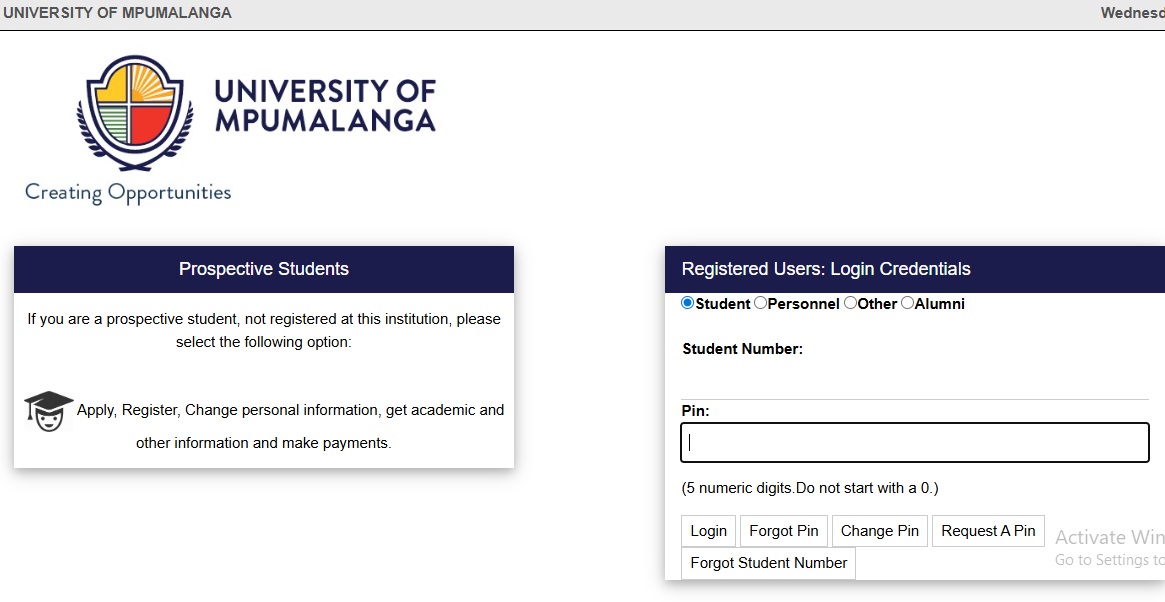
Open your web browser and go to the official UMP iEnabler site: https://ienabler.ump.ac.za/pls/prodi41/w99pkg.mi_login . It is vital that you only use this official URL. Be wary of phishing scams or third-party websites that ask for your personal information. The official portal address will always end with .ac.za.
Step 2: Log In with Your Credentials
On the login page, you will see fields for “Student Number” and “PIN.”
-
Enter your Student Number in the first field.
-
Enter your PIN in the second field.
-
Click the “Login” button to access your personal dashboard .
Step 3: Requesting a PIN (If You Forgot It)
It is common to forget a PIN created months ago. If you cannot remember it, do not panic. Look for the “Request a PIN” or “Forgot PIN” link on the login page . Clicking this will usually send a reset link or a new temporary PIN to the email address or cellphone number you used during your application. Check your inbox (and spam folder) for this message.
Step 4: Locate the Application Status Section
Once logged in, you will be taken to your student homepage. The layout is straightforward. Look for a tab or link that says “Application Status,” “Admission Status,” or something similar . It is often located in the main navigation menu or as a prominent tile on the dashboard.
Step 5: View and Interpret Your Status
Click on the Application Status link. The screen will refresh to display the current status of your application for the 2026/2027 academic year. You will see a message like “Received,” “Under Review,” or “Accepted.” The next section of this article will help you interpret exactly what these terms mean.
Important Considerations for a Smooth Check
-
Technical Issues: If the page fails to load, first check your internet connection. The iEnabler portal is generally reliable, but it can experience high traffic volumes, especially on weekdays during business hours or immediately after major results are released (like the NSC results in January) . If you cannot log in, wait a few hours and try again during off-peak times, such as early morning or late evening.
-
Outstanding Fees: In some cases, if you are a returning student or have a financial block, the system might restrict your access. For first-time applicants, this is less common, but it is worth noting that the university may withhold results or status updates if there is a financial discrepancy .
Decoding Your Application Status Messages
Once you log in, you will be met with a specific status update. These are standard administrative terms that indicate where you are in the admissions funnel. Understanding them helps you manage your expectations and know what action is required from your side.
-
Application Received: This is the first status you will see. It confirms that the University of Mpumalanga has successfully received your application and it is in the queue for processing. Your documents are likely being captured and attached to your file .
-
Application Under Review / Pending: This status means your application is actively being assessed by the admissions office. They are checking your qualifications, reviewing your matric results (or final degree transcripts for postgraduates), and ensuring you meet the minimum requirements for your chosen programme. This stage takes the longest, as the university has tens of thousands of applications to process .
-
Provisionally Accepted: This is a positive sign. Provisionally Accepted means you have met the initial entry requirements for the programme. However, your place is not 100% guaranteed yet. This status is often conditional upon you completing your current studies successfully or submitting outstanding documents. For example, if you applied with your Grade 11 results, your acceptance is provisional until UMP receives and verifies your final National Senior Certificate (NSC) results and confirms they meet the required APS score .
-
Awaiting Documents: You might see this status if your application file is missing a critical document, such as a certified copy of your ID, a sworn translation of a foreign qualification, or your final transcript. If you see this, do not wait to be contacted. Prepare the required document and upload it to the portal or deliver it to the admissions office as soon as possible .
-
Accepted / Firm Offer: Congratulations! This status means you have been officially offered a place at the University of Mpumalanga for the 2026/2027 academic year. You will typically see this status after UMP has verified your final results and confirmed that you meet all the criteria. The offer is usually for a specific programme .
-
Waitlisted: A “Waitlisted” status indicates that you meet the requirements for your chosen programme, but the class is already full. You have not been denied; rather, you are in line for a spot should any admitted student decline their offer or fail to register. It is advisable to keep checking your status if you are waitlisted, as spaces can open up right up until the registration deadline .
-
Not Accepted / Unsuccessful: This indicates that your application was not successful. This can happen for several reasons: you did not meet the minimum academic requirements for the programme, the programme reached capacity with higher-scoring applicants, or there were issues with your application completeness .
What to Do After You Receive Your Status
Seeing your status is just the first step. Your subsequent actions are critical to securing your place.
If You Are Accepted: The Path to Registration
An acceptance letter is your ticket to becoming a UMP student, but you must act on it immediately. The transition from “Accepted” to “Registered” is a distinct process.
-
Accept the Offer: The portal may require you to confirm your acceptance of the offer. This is usually a simple online step.
-
Register Online: For the 2026 academic year, UMP encourages students to register online. You will use the same iEnabler portal and your student number/PIN to complete your registration . Registration for first-year students typically begins in mid-to-late January, following the release of NSC results .
-
Pay Your Fees: Registration often requires a minimum upfront payment or proof of financial aid/bursary approval. Check the UMP financial page for details on fees and payment methods.
-
Prepare for Orientation: Once registered, keep an eye on your student email for information about orientation week. This is a vital period for familiarizing yourself with the campus, meeting lecturers, and making friends.
If You Are Provisionally Accepted
Do not be complacent. A provisional offer means you have work to do.
-
Submit Final Results: If your status is dependent on final results, ensure your high school sends them to UMP promptly. You can usually upload them to the portal yourself as a provisional measure.
-
Check Deadlines: There will be a deadline by which you must meet the conditions of your acceptance. Missing this deadline could result in your offer being withdrawn.
If You Are Waitlisted or Not Accepted
A rejection or waitlist notification is disappointing, but it is not the end of your educational journey.
-
Consider Alternatives: Look at programmes at UMP that might have lower entry requirements and are still open. You can also explore programmes at other universities with extended application windows.
-
Apply for 2027: If you set on a specific course, use the next year to improve your matric results or gain experience that will strengthen your next application.
Tips for a Successful Application Follow-Up
To ensure you navigate this process without stress, keep the following tips in mind:
-
Use Official Channels Only: There are sadly people who take advantage of anxious applicants. The University of Mpumalanga has explicitly warned prospective students not to pay any person or entity money to obtain admission . The only way to secure your place is through the official iEnabler portal. If you encounter any suspicious activity or anyone offering guaranteed admission for a fee, report it immediately to UMP’s whistleblowing hotline at ump@thehotline.co.za .
-
Keep Your Contact Details Updated: UMP will communicate with you via the email address and phone number you provided in your application. If you get a new SIM card or email address, you must update your details with the university. You can usually do this through the iEnabler portal.
-
Check Regularly, But Not Obsessively: While it is important to check your status, doing so every hour is unnecessary. UMP updates outcomes in phases, not all at once . Checking once a week, and then more frequently once the NSC results are released in January, is a sensible approach .
-
Contact Admissions for Help: If you encounter a technical glitch or have a specific query that the portal cannot answer, contact the UMP Admissions Office directly. You can reach them at studentapplications@ump.ac.za . For general inquiries, the main switchboard is +27 (0)13 002 0001 .
Waiting for a university response can feel like a test of patience, but with the right knowledge, you can turn that passive wait into an active, informed process. Understanding UMP how to check application status for the 2026/2027 academic year empowers you to take charge of your future. By using the official iEnabler portal, you gain direct, real-time insight into your application’s journey—from the moment it is received to the moment an offer is made.
Remember, the University of Mpumalanga is a sought-after institution, having processed over 124,000 applications for the 2026 intake. This level of interest means the system is busy, but it is robust. Whether your status reads “Received,” “Provisionally Accepted,” or “Firm Offer,” each step is progress. If you are accepted, follow the registration instructions promptly to secure your spot. If you are waitlisted, remain hopeful and explore your options. And if your application is unsuccessful, view it as a detour, not a dead end, and seek alternative pathways to your academic goals.
Read Also
- How to Check Your UNISA Application Status
- University Of South Africa UNISA Fee Structure
- UNISA Courses and Requirements
- UFS Late Application Opening Date
