

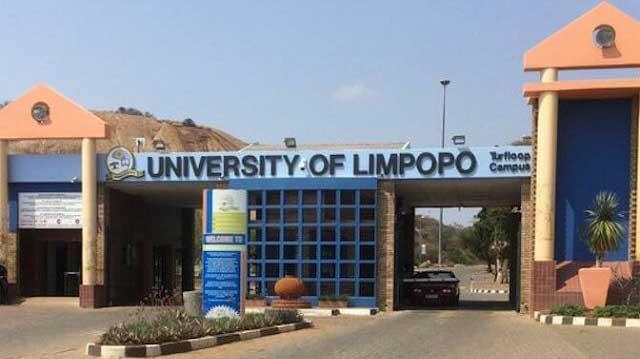
Applying to university is a significant milestone, and the period of waiting for a response can often feel like the longest part of the journey. If you have submitted an application to the University of Limpopo (UL) for the 2026 academic year, you are likely eager to know the outcome. This guide is designed to walk you through the exact process of how to check your application status at University of Limpopo 2026. We will cover everything from the initial login to understanding the various status messages you might encounter, ensuring you have all the information you need at your fingertips.
Why Choose the University of Limpopo (UL)?
Before diving into the technicalities of checking your application, it is worth reflecting on why UL remains a top choice for thousands of South African and international students each year. Understanding the institution’s value can make the anticipation of that status update even more meaningful.
A Legacy of Excellence and Innovation
Established as a higher education institution in 1959, the University of Limpopo has a rich history of producing competent professionals who contribute significantly to various sectors of the economy . Often referred to by its historic name, Turfloop, UL has transformed into one of Africa’s innovative universities, offering qualifications that are not only academically rigorous but also highly relevant to industry needs . The institution takes pride in being the first in South Africa to offer the highly sought-after Optometry programme and, since 2016, the first university accredited to offer the MBChB (medical degree) programme in the post-apartheid era . This pioneering spirit demonstrates a commitment to filling critical skills gaps in the country.
Academic Programmes Designed for Impact
UL’s academic structure is built around four main faculties: Humanities, Management and Law, Health Sciences, and Science and Agriculture . This diverse range means that whether you are interested in a career in chartered accountancy, a pursuit in the health sciences, or a future in agricultural innovation, there is a pathway for you. The university’s Programme Qualification Mix (PQM) is specifically designed to respond to the developmental needs of the local community and the continent at large . It is not just about earning a degree; it is about gaining an education that empowers you to find solutions for Africa’s challenges.
A Supportive and Holistic Student Environment
Beyond the lecture halls, UL is committed to developing well-rounded graduates. The university actively supports student entrepreneurship through various centres of excellence, such as the Limpopo Agro-Food Technology Station and the Student Training for Entrepreneurial Promotion (STEP) programme . Financial support is also a priority, with the Financial Aid Office guiding students on opportunities like the UL Merit Bursary, ensuring that deserving students can secure their future regardless of their financial background . When you apply to UL, you are not just applying for classes; you are applying for a full campus life experience that includes sports, recreation, and personal development .
Understanding the UL Application Status Check
The application status check is an online service provided by the university to give applicants a transparent view of where their application stands in the admissions process. It is the official channel to confirm whether your documents have been received, if your file is being reviewed, or if a final decision has been made . For the 2026 intake, regularly monitoring your status is crucial, as it ensures you don’t miss important instructions or deadlines regarding offers and registration.
Prerequisites for Checking Your Status
Before you begin, it is helpful to have certain pieces of information readily available. This will make the login process smooth and prevent unnecessary frustration. You will need:
- Your Student Number or ID Number: This was provided to you when you initially started your online application. If you cannot find it, check the email confirmation you received after submitting your application.
- Your Password or PIN: This is the confidential password you created during the application process. If you have forgotten it, most portals have a “Forgot Password” link to help you reset it .
- A Stable Internet Connection: Access to a reliable network on a computer, smartphone, or tablet will allow you to check your status from anywhere .
Step-by-Step Guide: How to Check Your Application Status at University of Limpopo 2026
Checking your status feels straightforward once you know the ropes, but UL’s process includes specific requirements to avoid common pitfalls. Applications for 2026 opened in April 2025 and close in October for most undergrad programs, with postgraduate deadlines varying by faculty. Status checks typically activate two weeks post-submission, peaking during offer periods from November to January.
Expect digital notifications via email and SMS alongside the portal. UL uses a secure Central Applications Office (CAO)-inspired system, but its own portal handles tracking. Here’s how you navigate it effectively.
Step 1: Navigate to the Official UL Status Check Portal
The first and most important step is to ensure you are on the official university website. This protects your personal information and guarantees that the information you receive is accurate. Open your web browser and go to the dedicated application status page. While the main UL website is www.ul.ac.za, the direct link to check your status is often hosted on a secure student portal . The most accurate and direct URL for checking your status is:
https://ulc-prod-webserver.ul.ac.za/pls/prodi41/w99pkg.mi_login
Always double-check the URL to avoid phishing sites or third-party platforms that may request your details .
Step 2: Log In to the Student Portal
Once you are on the login page, you will be prompted to enter your credentials.
- In the first field, enter your **Student Number** or your South African **ID Number**.
- In the second field, enter the **Password** or **PIN** that you created when you filled out your online application .
- After entering your details, click the **”Login”** or **”Submit”** button to access your personal dashboard .
Step 3: View Your Application Status
After successfully logging in, your dashboard will display your current application status prominently. This status will be one of a few key phrases that indicate where you are in the admissions process. It is important to read this message carefully, as it may also include specific instructions or requests for additional information.
Decoding Your UL Application Status for 2026
Seeing a status update is one thing, but understanding what it means for your future is another. Here is a detailed breakdown of the common statuses you might see and what they signify .
Application Received
This is the initial status you will see. It confirms that the University of Limpopo has successfully received and captured your application in their system. It means your documents are in the queue and awaiting initial review. This is a good sign, but it is not a final decision .
Application Under Review
At this stage, the admissions office is actively assessing your application. They are checking your National Senior Certificate (NSC) results or your latest academic transcripts against the specific entry requirements for the programme you applied for. This process can take some time, as applications are reviewed in batches .
Provisionally Accepted
Congratulations, you have cleared a major hurdle! A “Provisional Acceptance” means you meet the minimum academic requirements for the programme. However, the offer is not yet final. It is usually conditional on one of two things:
- Final Results: Your acceptance may depend on you achieving specific marks in your final Grade 12 exams.
- Space Availability: In competitive programmes, you may be provisionally accepted, but a firm offer will only be made once space is confirmed .
Firm Offer / Accepted
This is the status every applicant hopes to see. A “Firm Offer” or “Accepted” status means you have been officially granted a place at the University of Limpopo for the 2026 academic year. The portal will usually provide instructions on how to accept this offer. You must follow these steps promptly to secure your spot .
Waitlisted
Being waitlisted means you meet the qualifications for the programme, but the class is currently full. Your name has been placed on a list, and if a spot opens up (due to another student declining their offer), you may be offered admission. It is advisable to keep checking your status regularly if you are waitlisted, as this status can change up until registration closes .
Not Accepted
If your status reads “Not Accepted,” it means your application was unsuccessful for the 2026 intake. This can happen if the programme was too competitive, if you did not meet the specific subject requirements, or if the points score (APS) was lower than required. While disappointing, this status allows you to move forward and explore other options, such as alternative programmes at UL or applications to other institutions
What To Do After Checking Your Status
Once you have viewed your status, your next steps will depend on what that status is. Here is a simple guide to help you navigate the subsequent phases.
If You Are Accepted (Firm Offer)
Firstly, congratulations! Your hard work has paid off. Your immediate tasks are:
- Accept the Offer: Log back into the portal and follow the instructions to formally accept your place at the university. This is often a crucial step with a deadline .
- Prepare for Registration: Once accepted, you need to prepare for registration. The university has announced that registration for first-time entering students for 2026 will commence on Thursday, 22 January 2026 . Keep an eye on your email and the official UL website for your specific registration time slot and instructions.
- Arrange Funding: If you have applied for NSFAS or a UL Merit Bursary, ensure your application is finalized. Contact the Financial Aid Office if you have any queries .
If You Are Provisionally Accepted or Waitlisted
Patience is key here.
- Monitor the Portal: Check your status regularly, especially after the final NSC results are released in January 2026. Statuses can change quickly as final results are processed .
- Keep Details Updated: Ensure that your contact details (email and phone number) are correct on the portal so you do not miss any communication from the university .
If Your Application is Under Review
There is nothing more to do but wait. Avoid sending multiple follow-up emails, as this can slow down the processing time for the admissions staff. Continue checking the portal periodically for updates .
Important Dates for the 2026 Academic Year
Keeping track of key dates is essential. Here are the confirmed dates for first-time entering students:
- Normal Registration Period: 22 January 2026 – 30 January 2026 .
- Late Registration Period: 02 February 2026 – 06 February 2026 .
It is highly advisable to register during the normal period to avoid the late registration fee and to secure your place in your chosen modules.
Official University of Limpopo Contact Details
If you encounter technical issues with the portal or have a specific query that the FAQ cannot answer, do not hesitate to contact the university directly. Always use official channels to get accurate information .
- Enrolment Management Department (Application Enquiries): +27 (0)15 268 3332 or email enrolment@ul.ac.za .
- University Switchboard: +27 (0)15 268 9111 .
- Physical Address: University of Limpopo, Private Bag X1106, Sovenga, 0727, South Africa .
Checking your application status is a straightforward yet critical step in your journey to becoming a student at the University of Limpopo. By using the official portal and understanding what each status means, you take control of the process and ensure you are ready for the next phase, whether that is preparing for registration or considering alternative pathways.
Read Also
- How to Apply at University of Limpopo (UL)
- UMP late application Opening and closing date
- UMP How to Check Application Status
- UNISA Late Application Opening and Closing Date
